
Blended learning provides instructors flexibility as they leverage in-person instruction, hands-on experience, and on-line modules to build learning solutions. Learners find this model useful and supportive. We know blended learning works. Studies indicate that a mixture of well-prepared blended learning with proactive help and encouragement for ‘at-risk’ learners improves coursework retention without extra effort (Hughes, 2007). However, instructors must understand the landscape of engagement and motivation within their learning community when building the educational experience.
What does “well-prepared” mean?
- Modality covers the learning objectives
- Modality considers audience
- Modality considers barriers to learning (emotional, socioeconomic, behavior, etc.)
Amplifire is a question-based learning platform that uses active recall, priming, and more than 20 other cognitive triggers to help information stick. Can Amplifire be used as your primary method of instruction via eLearning?
Engagement
Any tool comes with risk for your learner engagement. Ask any learner: if the assignment requires only clicking through a PowerPoint or watching videos, will they enjoy it? Will they really know the content well enough to apply it? Instruction is multi-modal because our learners are multi-modal. Highly effective learning is not predictive, but adaptive to learners.
But what about scalability? This is the conundrum of instructional design.
Take running for example: If I only run twenty minutes a day at the same pace and on the same path, I will never become a better runner. In fact, it’s very likely I will stop running from boredom and a lack of progress. I become a better runner by varying the terrain and pace. This is also true for our learners. If we want to make our learners experts, delivery matters.
When building a larger blended learning curriculum, Amplifire can replace key components of your programs. If you have self-guided components of your instruction, Amplifire can replace that. You should, however, consider length of training, audience characteristics, and other variables as you make this decision. Amplifire forces engagement and drives a higher brain load than a typical eLearning experience. It should be noted for any eLearning that there is a vast difference in learner engagement between 2 hours and 16 hours of direct instruction.
As instructional designers we must make trade-offs. Can we maintain content in various places to ensure the richest learning experience, or do we build content with longevity in mind?
Key questions to consider when using Amplifire to replace didactic instruction:
- How complex are my learning objectives?
- How long is the current training?
- Will there be follow-up or coaching?
- What does mastery look like?
- Will there be simulation or hands-on learning
- How frequently does the content change?
Generally, the longer the training on a subject the higher the need for a variety of instruction. When the amount of estimated total Amplifire training is greater than two hours, we recommend having other options provided to learners. While question-based learning is proven to be effective, as with any tool it can result in learner fatigue.
Blended Learning in Practice
So, what do you use? When do you use it? Is there a silver bullet? This answer isn’t easy, but doing the right thing often isn’t easy!
You use the right tool at the right time. Each of these elements are tools in the toolkit of delivering a meaningful learning experience. Amplifire is one more tool to add to the arsenal. In some scenarios, it might be the primary tool used; in others, Amplifire is best used in conjunction with other tools. This is determined by examining the context of the learning objective, learner needs, and the best use for each tool in your arsenal. See the Appendix below for descriptions and examples of use for each.
Structure
Blended learning at its highest level is incorporating different ways to engage the learner to support knowledge building across a subject. Traditionally in the implementation space, it manifests as the following:

The model above assumes that the one delivery mechanism/collateral (i.e., eLearning Introduction) is right for all learners for that subject. The better approach is to consider what the learner’s needs will likely be based on your understanding of the audience, and tailor a variety of options to those needs and the subject. Considering the previous example, learning could be better scaffolded in the following way:
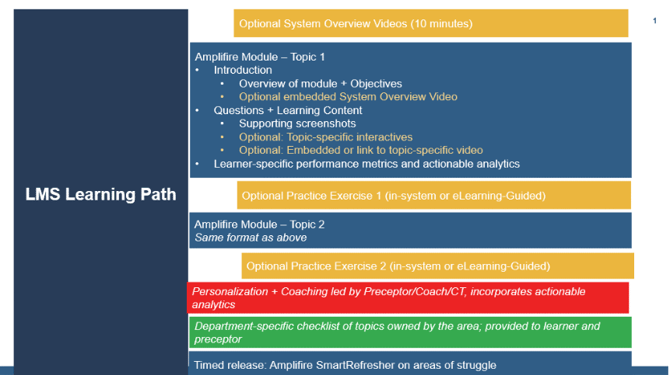
In the example above, multiple modalities are used to engage the learner in ways or on topics that might benefit from a different approach, and the learner can circle back to them as needed. Additionally, modality “breaks” help the learner mentally compartmentalize the information they are learning, which supports better attention and retention.
Note that all optional elements are noted in yellow. Including different modalities as options in the learning journey (with explanation and expectation around why and when to engage with that content) allows the learner to direct their journey while mitigating the overhead and burden on the learning team for manual intervention and direct instruction with little to no proof that the learner “got it”.
Mapping
To build the learning path you need a plan. Creating a matrix of what topics will be covered in what modality or collateral helps educators, learners, and operational leaders understand where and when topics will be addressed.
Maintenance
It's important to remember that EVERYTHING you create requires maintenance, which is no small feat. Your team must be disciplined in:
- Cataloging what you create (ideally within the learning matrix or lesson plan matrix for the role)
- Establishing, communicating, and holding each other accountable to the parameters/policies for what constitutes an update and how that update will be published
- Setting a schedule for when collateral will be reviewed/refreshed (per the processes established above)
- Making the necessary changes.
Amplifire Examples
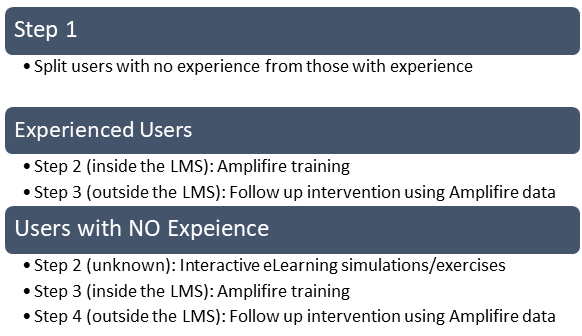
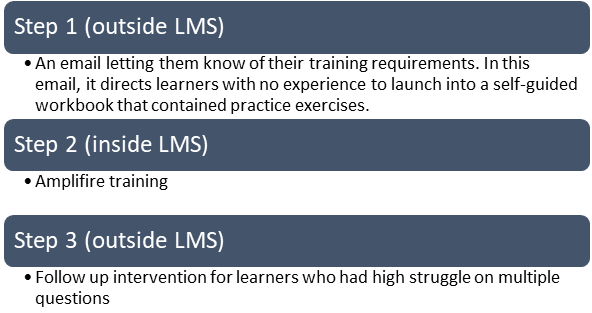
Our clients have taken different approaches to rolling out Amplifire to their clinicians. For each one Amplifire replaces the bulk of the previous curriculum, but depending on the resources and infrastructure available to the client, there are other modalities involved:
Client 1:
Client 2:
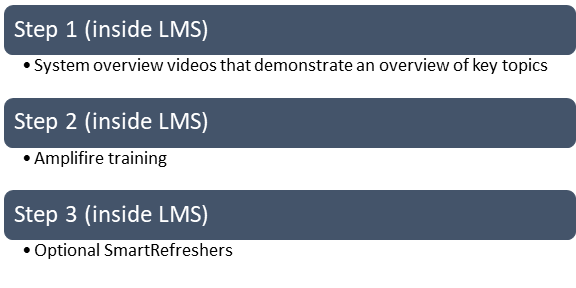
Client 3:
Collateral Overview and Examples
Each of the elements noted earlier has a time and place for best application. Refer below for more information on when and how to apply.
Amplifire
- What it is: Adaptive learning platform that respects learner experience and knowledge by tailoring what information is presented based on learner accuracy and confidence with the subject matter.
- Best applied to situations: Where learners have received some context and introduction to the material. This can be provided within Amplifire through embedded videos and interactive elements to introduce and reinforce content taught through the module. Amplifire is used by clients to train learners as part of new implementations, onboard team members with or without specific experience, for test-out of learners to quickly provision, for efficiency training, and for upgrade training.
- Best applied for learners who: Have at least minimal exposure to the content to be taught and are introduced to a flipped learning model ahead of module assignment. Setting the right expectations for the learner (that the module is going to teach them, and is not punitive in nature) is critical to the success of the learner and adoption.
ILT lessons + synchronous discussion forums
- What it is: Traditional, live training (virtual or in-person); may be a scheduled class, department meeting, lunch and learn
- Best applied to situations: Where the learning objectives or proposed change will likely result in significant impacts to the learner’s foundational workflow or cause confusion. Often, if there are changes to a handoff that require more/less steps or another role/department, walking through or discussing the change in a forum that allows learners to feel all steps, questions, and the “why” are addressed leads to better adoption.
- Best applied for learners who: Will see significant change to how many functions of their day are performed. Setting the foundation for the new implementation, especially for those with no experience in that is especially useful. Also consider that ILT may be best for learners without prior industry/topical knowledge or experience on the subject, though it can be replaced with other asynchronous blended learning methods as long as one element is coaching/mentoring/onboarding with another team member knowledgeable in the system and how to interpret/apply department specifics. This often (though not always) might apply to new team members in front desk/business office or allied health professionals.
Practice exercises
- What it is: An opportunity for the learner to experience the system by walking in a guided or unstructured scenario. Allows the learner to touch/feel the system and often (though not always) see the immediate result of their actions, validating their understanding of the algorithm and output.
- Best applied to situations: In newly establishing familiarity with the user interface or for learners who need to build muscle memory for steps in a process to increase efficiency in their day-to-day work.
- Best applied for learners who: Do not have prior experience in the system, or do not have experience with speed/efficiency options that will decrease documentation time if used effectively.
Tip sheets
- What it is: A quick (1 – 2 page) overview of how to do something. Think of things like the numbered steps in an algorithm, with minimal supporting details or “why” associated with each step.
- Best applied to situations: Where the learner knows what they want to accomplish and need help recalling the specific steps. Especially helpful for processes not performed often. Like Google searching, tip sheets are best used for quick reference/recall of a step but should not be counted on to lock-in learning or memory unless the learner references repeatedly (which will likely build muscle memory for the steps).
- Best applied for learners who: Are self-directed (“I want to be able to find the answer myself and not have to ask someone”) and have tools/functions that while uncommon might be applied in >20% of their work.
System overview videos
- What it is: Demonstrations of what the system looks like, how to navigate. The learner clicks “play” and is passive in watching the recording illustrate the key areas of the screen and workflow important to that learner.
- Best applied to situations: Where the learner needs a broad introduction to the system before going deeper on specific activities, tasks, and features. As learner attention spans decrease, consider using or creating videos that are well-balanced in length and subject matter. You could create a video that walks step-by-step through the entire rooming workflow, but that 15-minute video might be difficult for your MA to sit through and refer back to specific pieces of if needed later on. Creating videos in shorter, topic-focused chunks and sequencing them in workflow order allows learners to both pay attention to one topic before a mental break AND intersperse the video with other learning activities that strengthen their understanding and mastery of that topic.
- Best applied for learners who: Have no experience with the application in the context of the role, or learners who have some external familiarity with the system but are not yet acquainted to your organization’s design/setup.
Skill-targeted demo videos
- What it is: Think TikTok or Instagram Reels. These are short videos that in under two minutes can show a learner how to do something faster, better, easier. They should be easily digestible, regularly (but inundating) sprinkled into the learner’s daily activities, and ideally available on both a PC and mobile platform. If the learner is checking their email as they ride the elevator up to start their shift and can quickly see how to effectively document something, they are more likely to incorporate the learning than if they need to make time to watch a 10-minute explainer video.
- Best applied to situations: Where the learning objective is stand-alone and there is a single action or behavior you want to change through quickly demonstrating the “how” and “what’s in it for me”.
- Best applied for learners who: Already have familiarity with the system and are unable to “carve out” time in their day for formal learning. Tech-savvy learners who understand how to manipulate windows on a device to move back and forth between the video and the source (email, LMS, learning home dashboard, etc.)
Interactive eLearning simulations/exercises
- What it is: Many vendors provide interactive, guided click-through simulations via platforms like Adobe Captivate that can be used as an out-of-the-box introduction to core system features. These might include demonstrations, periodic questions to force engagement, or click-through exercises with automated guidance to direct learners to the correct actions on the screen (what to click, what to type) to advance the module.
- Best applied to situations:
- When you want learners to focus on building skill and familiarity with defined learning objectives (and not be distracted by exploring other areas of the system).
- There are multiple steps in a process that require chronological completion; it might be technically possible to do things out of order, but that could result in inefficiencies or a downstream gap in the workflow.
- This is also appropriate when it’s not possible to configure a practice exercise (due to build limitations, resource limitations, or issues with scaling across multiple learners.)
- Best applied for learners who:
- Do not feel comfortable with the user interface or might struggle with technology and common nomenclature and will benefit from having guidance automatically provided when the wrong area of the screen is selected;
- Are permitted to practice on their own (per employment contract) and have access to the LMS outside of the organization firewalls but are unable to access a playground environment via Citrix outside of their department or classroom;
- Are unable to practice a workflow requiring two participants for completion. The eLearning can simulate the steps of the second participant to demonstrate how their steps impact the learner or outcome.
In-system learning resource indexing
- What it is: Several vendors provide an in-system learning resource that serves as the “learning home” for resources a learner might need to reference during their day. Often, these resources are links to documentation that lives outside of the software, but can be searched for quick reference, and may include any of the collateral noted above.
- Best applied to situations: Where learners are not trained or familiar with accessing other software that “houses” the collateral (i.e., LMS, SharePoint). It can be used to point to other activities, though it’s worth noting that the more “clicks” or “redirections” a learner experiences, the higher the likelihood for disengagement. The learning dashboard is built to be context-specific to the learner role, and thus only serves up collateral appropriate for that role and their associated activities. The dashboard is also an effective tool (if introduced and maintained) as a communications hub for learners to communicate upcoming changes, fun facts, successes, etc.
- Best applied for learners who: Want to “search” for how to do things on their own or are looking for the tip sheet on how to perform an unfamiliar task.
What Differentiates How Amplifire Works?
- One way to adapt is to use a simple item-response approach to adaptivity. This means that if you get a question wrong, the system asks you an easier one; if you get a question right, the system asks you a harder one.
- Another approach to adaptivity is to use more advanced algorithms (e.g., Bayesian models) to estimate what learners know versus don’t, and what they should see sooner, later, or never. Bayesian systems ask learners questions to determine the state of their knowledge and direct them to more basic or more advanced content to fill in knowledge gaps.
- In Amplifire, every learner encounters every item. Especially in the context of the other approaches, that probably doesn’t seem very adaptive! Instead, Amplifire adapts in several other ways.
- How long each learner needs to spend on each item. When a learner already knows something, they only spend as long as it takes to answer the relevant question—often only a few seconds. Amplifire devotes more time to content where learners are struggling or where their metacognition is skewed.
- Added benefit: Because Amplifire asks every person every question, our reports can provide diagnostic information about what the entire population knew about each concept before training began.
- What a learner needs to see next. Amplifire decides what item a learner should next encounter. This algorithm shuffles content in ways that best benefit learners.
- Whether to provide corrective feedback. Everyone sees “valence feedback,” which tells a learner whether they were right or wrong. This gamification boosts learners’ dopamine, causing better retention and more engagement.
- How long to wait before providing corrective feedback. If the learner wasn’t confident and correct, Amplifire does not immediately correct them.
- Whether and how long the platform waits to ask a question again. If a learner has become confident and correct and their prior responses do not indicate that the item will quickly slip out of memory, the system will consider that item mastered. If the learner needs to see the item again, Amplifire harnesses the spacing effect (Landauer & Bjork, 1978) by waiting to repeat the item.
- Whether to issue meta-guidance to the learner. A learner who is rushing through can receive a message to slow down; someone who is starting to drag and struggle can receive a suggestion to take a break. A learner who has fallen behind on their assignments can receive an email prompting them to catch up.
- How long each learner needs to spend on each item. When a learner already knows something, they only spend as long as it takes to answer the relevant question—often only a few seconds. Amplifire devotes more time to content where learners are struggling or where their metacognition is skewed.