
In this article, you'll learn about the art of the question chain.
For more information, check out:
Question Chains in Amplifire allow you to link up to five questions together in a specific sequence, creating a guided learning pathway. While the Amplifire learning algorithm typically tailors question delivery to each learner's needs, chaining questions ensures that sequential questions are always delivered in your designated order.
Structuring Your Question Chain
Don't chain questions just because they cover the same topic. Only use chains when the sequential order genuinely matters for learning or assessment accuracy. Questions that test related concepts but can stand independently should remain unchained so Amplifire's algorithm can optimize their delivery.
Planning Your Chain
Before creating a chain, map out your sequence:
- Identify the learning objective - What specific skill or knowledge requires sequential assessment?
- Determine logical progression - How should questions build on each other?
- Limit your chain length - Use 2-5 questions (maximum of 5)
- Ensure true dependency - Each question should genuinely require the context of previous questions
Questions in a chain don't need to increase in difficulty. Focus instead on logical sequence and realistic application of knowledge.
Creating the Chain
To chain questions:
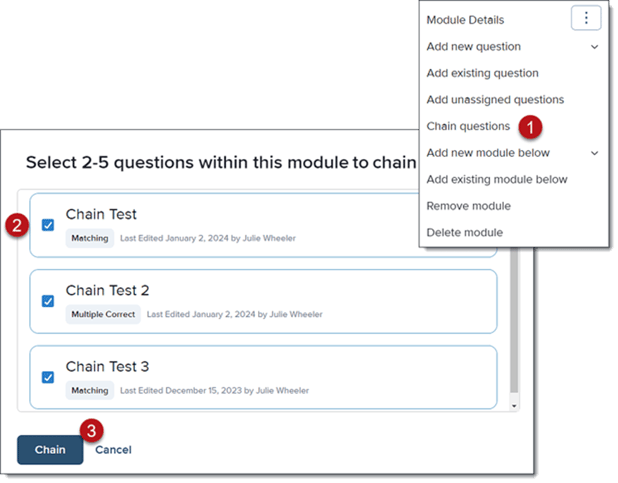
- From the three-dot menu beside the module, select the Chain questions option
- Click the boxes beside each question (between 2 and 5 questions) you'd like to add to the chain
- Click Chain
The chained questions will display with links beside each question in the chain.
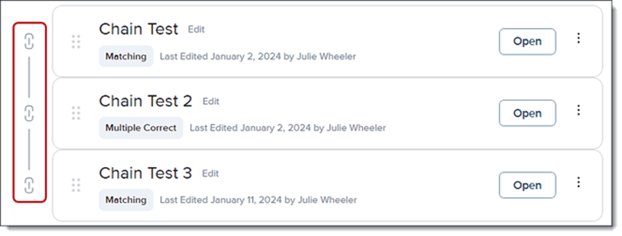
You can reorder questions within a chain at any time by dragging them to a new position. To unchain questions, simply remove them from the chain, your questions will remain intact and can be used independently.
Using Information Pages with Question Chains
An information page can be added at the beginning of your Question Chain to provide learners with essential context before they encounter the chained questions. When included, the information page always appears first in the sequence, regardless of when you add it during authoring.
When to Include an Information Page
Add an information page at the start of your chain when you need to:
- Provide context or background before presenting a series of related questions
- Display reference material that learners need to answer multiple questions (diagrams, charts, data tables)
- Introduce a case study that subsequent questions will build upon
- Present instructions or rules that apply to all questions in the chain
- Show multimedia elements (videos, images, documents) that set up the scenario
Designing Effective Information Pages for Chains
Since learners view the information page once before encountering the questions, design it strategically:
Keep it focused and relevant. Include only information that learners need to answer the chained questions. Avoid extraneous details that don't serve the assessment.
Use clear formatting. If presenting complex information like patient data, lab results, or system specifications, organize it logically with headers, tables, or visual hierarchy.
Make it memorable. Since the page disappears once learners begin answering questions, present information in a way that learners can retain. Consider using:
- Visual aids (diagrams, flowcharts, annotated images)
- Bulleted key points rather than dense paragraphs
- Highlighted or bolded critical data
- Realistic formats (e.g., actual patient charts, system screenshots, procedure checklists)
Ensure all questions relate back to the page. Every question in your chain should require information from or reference the content on your information page. If a question doesn't connect to the page content, it may not belong in this chain.
Example: Clinical Scenario Chain
Information Page: Displays a patient case presentation including vital signs, chief complaint, medical history, and current medications.
Question 1: What is the most appropriate initial assessment for this patient?
Question 2: Based on the patient's symptoms and history, which diagnostic test should be ordered first?
Question 3: Given the assessment findings, what is the priority nursing intervention?
Each question builds on the case presented and requires learners to recall and apply information from the initial patient presentation.
The Learner Experience
Understanding how learners encounter your question chain helps you design more effective content.
What Learners See
- Information page (if included) displays first with all context, reference material, or scenario details
- Information page disappears once the learner proceeds to the questions
- Questions appear one at a time in the order you specified
- No chain indicators - Learners don't see "Question 1 of 4" or know they're in a chain
- Continuous flow - Learners progress through all questions in the chain regardless of their answers
What Happens After
- If a learner answers a question incorrectly, they continue through the remaining questions in the chain
- Amplifire schedules a review of any missed questions for a later time
- The algorithm will not break up your chain, chained questions always appear together in sequence
Best Practices for Quality Question Chains
Ensure genuine sequential dependency. Ask yourself: "Does this question truly require the context of the previous question?" If learners could answer it independently, don't chain it.
Test your chain logic. Walk through the sequence as a learner would. Does the progression make sense? Can learners reasonably remember the necessary information from the page?
Keep chains focused. Shorter chains (2-3 questions) often work better than maxing out at 5 questions. Only include questions that genuinely belong in the sequence.
Maintain realistic scenarios. If you're chaining questions around a case study or procedure, ensure the scenario remains consistent and realistic throughout all questions.
Balance challenge with fairness. Remember that learners see the information page only once. Don't include so much information that recalling it becomes the primary challenge rather than demonstrating the target knowledge or skill.
Question Chains are powerful tools for assessing sequential knowledge and creating realistic scenario-based learning experiences. Use them strategically when order matters, structure them with clear logic and appropriate context, and always design with the learner experience in mind. When crafted thoughtfully, question chains enhance both assessment validity and learner engagement.