
In this article, you're learn about how to construct the learning portion of a question in Amplifire.
For more information on creating questions, check out:
The Purpose of WYNTK
The "What You Need To Know" (WYNTK) is a core instructional feature in Amplifire that delivers targeted explanations to learners at the precise moment they need it most. This isn't just supplementary content; it's a critical teaching tool that directly impacts whether learners will answer correctly the next time they encounter similar material.
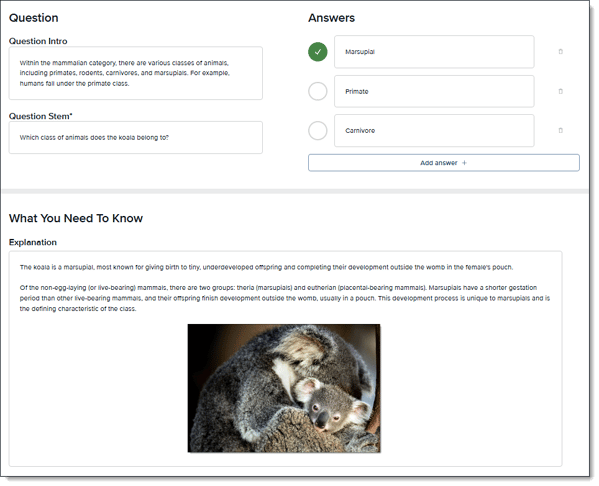
How the WYNTK Function Works
Understanding how to leverage the WYNTK field in Amplifire content is essential, and requires that you grasp:
The Learner Experience
Understanding how learners interact with the WYNTK is essential to creating effective explanations. Here's the complete flow:
During a Learning Round:
- Learners answer questions in a round
- Amplifire's adaptive algorithm monitors their performance in real-time
- When a learner gets enough questions wrong during that round, the algorithm triggers the WYNTK function
- The learner then sees the WYNTK explanation for questions they answered incorrectly
- This immediate feedback helps correct misconceptions while the question is still fresh in their mind
The Algorithm at Work
The WYNTK function is powered by Amplifire's adaptive learning algorithm, which determines exactly when learners need explanations based on their performance patterns. This means:
- Not all incorrect answers immediately trigger a WYNTK
- The timing is optimized for learning effectiveness
- Learners who answer all questions correctly never see WYNTKs (they don't need the remediation)
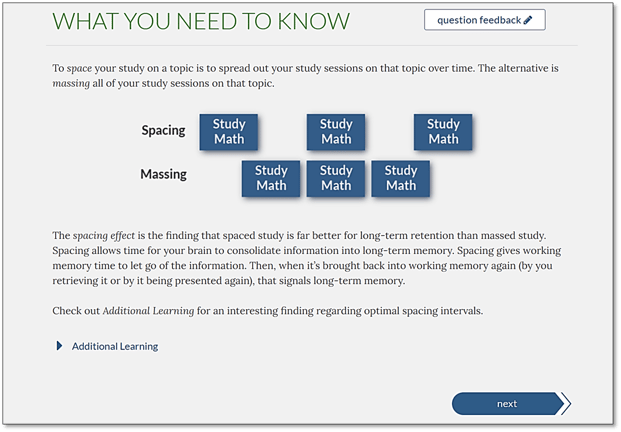
The 12-15 Second Window
Analytics reveal that learners typically spend only 12-15 seconds viewing a WYNTK explanation. This is a critical functional constraint that shapes how you should approach WYNTK content. The function is designed for quick, targeted learning interventions, not comprehensive lessons.
This brief engagement window means your WYNTK must:
- Deliver the most critical information first
- Be scannable and easy to digest quickly
- Focus on one key concept rather than multiple ideas
- Use visuals when they can communicate faster than text
What Happens When WYNTK is Left Blank
When the WYNTK function triggers but finds no content, learners receive no educational support after their incorrect answer. This significantly undermines the adaptive learning algorithm's effectiveness because:
- Learners don't understand why they were wrong
- They have no new information to improve their knowledge
- They're likely to get the same question wrong again in future rounds
- The teaching moment is completely lost
Leaving WYNTK blank is strongly discouraged as it essentially disables one of Amplifire's most powerful learning functions.
The Four Core Functions of WYNTK
The WYNTK serves four essential instructional purposes. Understanding these functions helps you create more effective explanations:
- Explain Why Answers Are Correct and Incorrect
The primary function is to help learners understand the reasoning behind the correct answer. This goes beyond simply stating what the right answer is.
Good example: "Handwashing must occur before donning gloves because gloves can have microscopic tears or be contaminated during the donning process. Clean hands ensure that any breach in glove integrity doesn't lead to pathogen transmission."
Not-so-good example: "The correct answer is before donning gloves. Always wash your hands before putting on gloves."
Why this doesn't work: It restates the answer without explaining the reasoning, failing to fulfill the primary function of WYNTK. - Correct Confidently Held Misinformation
When learners are confident in an incorrect answer, the WYNTK function becomes even more important. This is your opportunity to directly challenge and correct misconceptions.
Good example: "While many people believe vitamin C prevents colds, research shows it only slightly reduces cold duration in people who take it regularly, it doesn't prevent colds from occurring. The correct answer, frequent handwashing, is proven to reduce cold transmission by up to 50%."
This function is especially critical because confidently held incorrect information is harder to change and more likely to persist without intervention. - Address Ambiguity
When multiple answer choices seem plausible or similar, the WYNTK function clarifies the distinctions that learners need to understand.
Good example: "All the mammals listed give birth to live young, but only marsupials like the koala have a significantly shortened gestation period and complete development in the mother's pouch. Primates, carnivores, and placental mammals’ complete fetal development entirely in the womb." - Correct Plausible Distractors
Well-written questions include plausible distractors, incorrect answers that seem reasonable. The WYNTK function addresses why these seemingly logical answers are actually incorrect.
Good example: "While studying all your math as close to the exam as possible might seem efficient, spaced repetition, studying some material today, some tomorrow, and some the next day, leads to better long-term retention. Cramming creates short-term memory that fades quickly after the exam."
Content Guidelines for Effective WYNTK Function
Optimal Length: 90-150 Words
Given the 12-15 second viewing window, the recommended length is 90-120 words, with a maximum of 120-150 words.
This isn't an arbitrary limit, it's based on how the WYNTK function is actually used by learners. Longer explanations reduce engagement and effectiveness.
Example of appropriate length: "The correct answer is insulin. Type 1 diabetes occurs when the pancreas produces little or no insulin, the hormone that regulates blood glucose levels. Without insulin, glucose cannot enter cells and builds up in the bloodstream. This differs from Type 2 diabetes, where the body becomes resistant to insulin but still produces it. Treatment for Type 1 diabetes always requires insulin therapy." (78 words)
Example of content that's too long: "Diabetes is a complex metabolic disorder that affects millions of people worldwide and has been studied extensively since its discovery in ancient times. The pancreas is an organ located behind the stomach that has both endocrine and exocrine functions. In Type 1 diabetes, which is an autoimmune condition, the beta cells in the pancreas are destroyed by the body's own immune system, leading to an inability to produce insulin..." (continues for 300+ words)
Why this doesn't work: It exceeds the functional viewing time, includes unnecessary background information, and dilutes the core message learners need.
Use Multimedia to Enhance the Function
The WYNTK function supports multiple media types, which can significantly enhance learning, especially for visual or procedural content:
Supported media types:
- Images
- Videos
- Files
- Links
- Dynamic content
- Formatted text (bullet points, bold, italics, etc.)
For workflow-based content especially, showing learners the process visually is often far more effective than describing it in text, making better use of the WYNTK's limited time window.
Technical Note: Images must NOT be pasted using Ctrl+V. They must be uploaded through insert/upload function in the editor.
Best use cases for visual media:
- Workflows and procedures (show the steps)
- Equipment identification
- Complex processes that are easier to show than describe

For more information on using multimedia, check out Multimedia Best Practices.
Common Mistakes That Undermine WYNTK Function
Leaving the WYNTK Blank: This completely disables the WYNTK function. When learners get a question wrong and the system triggers the WYNTK but finds no content, the learning opportunity is lost. This is the most critical mistake to avoid.
Making Content Too Long: Explanations exceeding 150 words defeat the purpose of the WYNTK function. Learners disengage, and the quick intervention becomes a lengthy lecture they'll skip or ignore.
Just Restating Information: The WYNTK function should provide new understanding, not simply repeating the question or answer.
-
Not-so-good example: "The correct answer is 'notify the physician immediately.' You should notify the physician immediately when you see these symptoms."
Why this doesn't work: Provides no new information or reasoning, wasting the WYNTK function.
Explaining Every Distractor in Detail: You don't need to address every incorrect answer choice. The WYNTK function is most effective when focused on the correct answer and perhaps one or two key misconceptions.
Using Unexplained Jargon: If technical terminology is necessary, briefly define it. The WYNTK function is triggered when learners demonstrate a knowledge gap, so don't assume they understand specialized vocabulary.
Maximizing the WYNTK Function
Preview your content: Always preview how your WYNTK displays to learners to ensure the function works as intended, that formatting renders correctly and media displays properly.
Copy and adapt for efficiency: The authoring interface allows you to copy WYNTK content between similar questions, then modify as needed. This streamlines the creation process while maintaining consistency.
Consider linking for complex topics: Rather than overloading the WYNTK with information, use its limited space for core concepts and link to Additional Learning for learners who want to dive deeper.
Additional Learning Section
Additional Learning is an optional field to supplement/complement information provided in the What You Need to Know.
Some good information to add here can include:
- Information that is related but not necessary to answer the question
- Further explanation that most will not need but some would like to see
- Citations to outside sources used
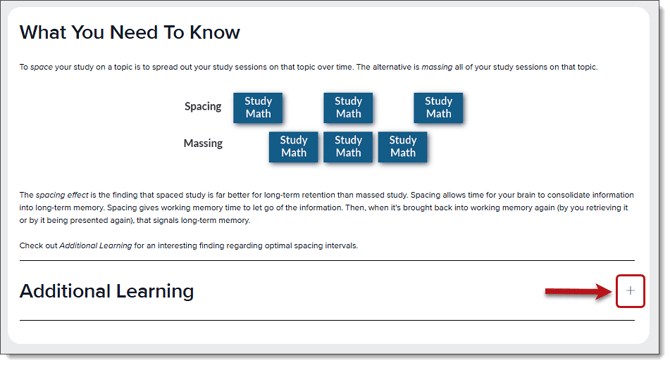
Note: Because this will appear as a closed panel that learners will need to open to view this information, add good-to-know but not necessary information here.
For more information about creating effective questions and distractors that work with the WYNTK function, see our article, Parts of a Question.