
In this article, you'll learn about how to improve your course over time.
For more information on writing questions:
- Check out Creating Quality Questions
- Contact your Client Solutions Manager to learn more about author training
Whether your content is constantly changing or you just want to keep your learners interested and provide the best learning experience possible, iteration is a powerful tool to boost your courses' effectiveness.
Updating Content
Whether you have content your learners need to complete yearly or you have new learners who need trained, it is important to update your content. There are several ways to update a course:
Note: Any structural changes made to published content, such as adding or removing answer choices or modules, or changing question types require you to republish your course.
Republishing an Existing Course
Making changes to an existing course and then republishing it all at once can have several benefits:- Make changes to live content without instant publication so others have the chance to review content in a course before it is pushed live to learners.
- Make major content updates without needing to create new SCORM files.
- Manage the timing of updates of separate courses that share content.
With this updating method, you can make all the necessary changes to your course, review it, and publish a new version that all learners who have not yet started the course will see.
Note: Republishing content can significantly affect learning and reporting because it will change content for all learners.
Copying an Existing Course
If you have learners who will still need your course in its original form, you can make a copy of your course, make all your changes, and publish a new course. The biggest benefit of this process is that you can preserve the original course and allow its learners to continue with it even as you make changes and launch a new course.
The downside to this approach is that you will have to implement the new course rather than keeping the same implementation as you can with the other methods.
Pushing Changes Live
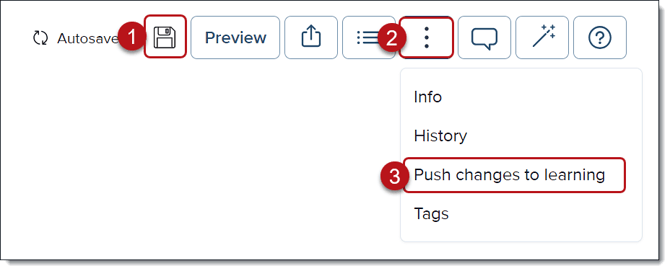
Sometimes you just want to make minor edits without republishing your course. You can correct typos and make small content changes without needing to publish a new version. These changes are pushed live but are not tracked. To push changes live on published content:
- Make the desired changes
- Click on the three-dot menu in the question
- Click Push changes to learning
For more information on how and when iteration will be most beneficial for your learners, check out Using the Amplifire Reporting Dashboard.