
In this article, you'll learn to create effective, engaging questions that drive meaningful learning outcomes by:
- Designing questions at the right difficulty level for your audience.
- Using Amplifire’s unique features to enhance learning.
- Avoiding common pitfalls in question writing.
- Aligning questions with cognitive levels.
For more information, check out the Knowledge Base article, Using Bloom's Taxonomy.
Amplifire prioritizes mastery, understanding, and long-term retention over traditional testing. As an author, your role is to craft questions that accurately assess where gaps exist in learners' knowledge, adapt to learner confidence, recognize and remediate CHM, and guide users toward deeper understanding.
Why Question Design is Different in Amplifire
On a traditional test, difficulty is usually judged by one measure: percent correct. A "hard" question is one people get wrong. That framing doesn't work in Amplifire, because Amplifire isn't a testing platform—it's measuring the relationship between what a learner knows, what they think they know, and what they're willing to act on.
Every question asks two things at once:
- Is this answer correct?
- How confident are you? (including the option to say I don't know yet)
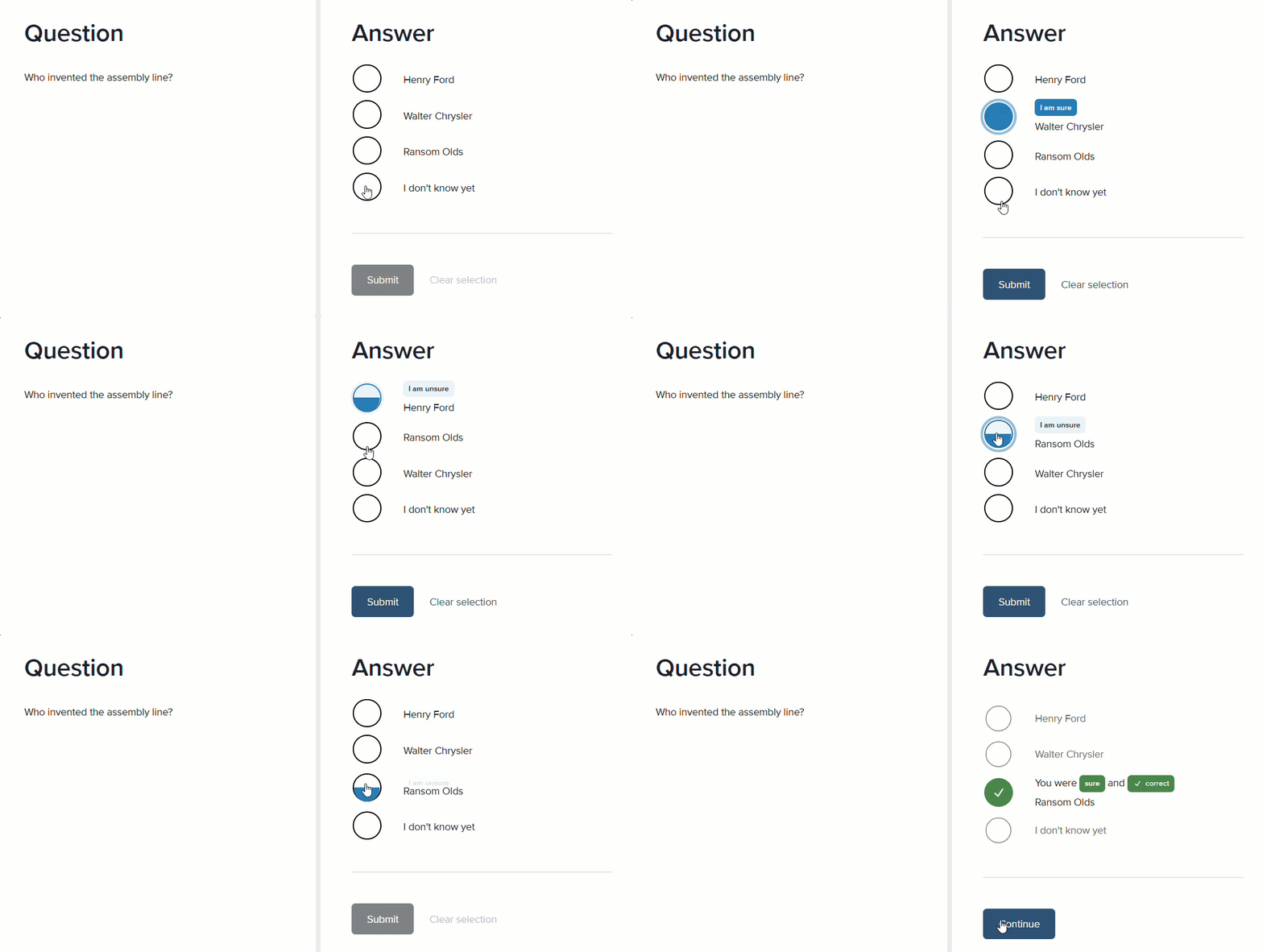
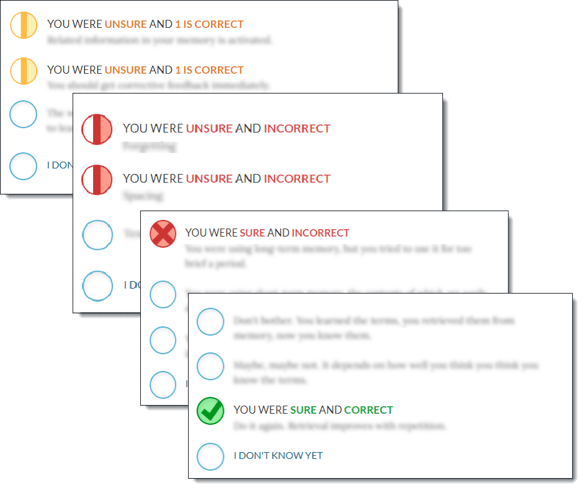
Because of that extra dimension, a question's real "difficulty" shows up as a pattern across five possible outcomes, not a single score:
| Learner said... | Answer was correct | Answer was incorrect |
|---|---|---|
| Confident | Mastery | Confidently Held Misinformation (CHM) that needs to be corrected |
| Not confident | Prior knowledge / partial knowledge |
Opportunity to Learn |
| I don't know yet |
No right or wrong—Opportunity to Learn |
|
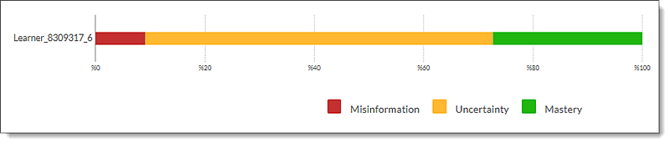
A question that's "difficult" in the traditional sense (low percent correct) could be perfectly healthy in Amplifire if learners don't know and know they don't know. We call that desirable difficulty because it enables efficient, effective learning to occur. In the chart below, the learner saw a good percentage of the What You Need to Know (WYNTK) sections, but the blue bar indicates that they saw the WYNTK only once before mastering the content.

Another important form of difficulty is the one that identifies CHM: learners confidently choosing the wrong answer. That's not a "hard question," that's a brilliant one, and it's the pattern Amplifire is specifically designed to surface and correct through repetition.
So the job of an author isn't to make questions easier or harder in the traditional sense—it's to write questions that generate an honest signal about where a learner truly stands, for the audience actually taking the course.
Two Different Things People mean by "Difficulty"
It helps to separate these explicitly, because they call for different fixes:
-
Content difficulty: The underlying concept is genuinely advanced, nuanced, or rarely encountered. This is a property of the subject matter and the learning objective, not of the question wording.
-
Artificial difficulty: The question is harder than the concept requires because of how it's written: convoluted stems, negative or double-negative phrasing ("Which of the following is NOT an exception to..."), overly close distractors that hinge on trivia rather than understanding, or answer choices that require outside assumptions not taught in the material.
Artificial difficulty is almost always worth removing, regardless of audience. It doesn't measure knowledge. It measures test-taking skill and tolerance for ambiguity, and in a confidence-based system it actively corrupts your data. A learner who genuinely understands the concept but gets tripped up by convoluted wording will often still answer confidently (because they do understand the underlying idea) and land in the CHM quadrant for the wrong reason. That pollutes your results and misdirects remediation.
Content difficulty, on the other hand, is something you calibrate deliberately based on who's in front of you.
Amplifire’s adaptive learning model relies on:
- Confidence-based responses: The platform allows learners to rate their certainty before answering, triggering metacognition and a deeper connection with the materials.
- Performance tracking: Question repetition and frequency adjust based on past accuracy and confidence, and the Amplifire Reporting Dashboard provides analytics for learner remediation and course revision.
- Targeted feedback: Amplifire uses both immediate right/wrong feedback and delayed feedback that provides learning.
Key principles for authors:
- Match question difficulty to the learner’s level (too easy = disengagement; too hard = frustration)
- Write clear, concise, and unambiguous questions
- Use scenarios and real-world contexts where appropriate to engage learners by personalizing learning
- Leverage Amplifire’s features (e.g., WYNTK, “I don’t know yet”) to improve learning
Calibrating for your Audience
The same learning objective can justify very different question designs depending on who's answering. A few common audience profiles:
Novice or first-time audience
- Favor questions that test the concept directly and cleanly before layering in edge cases or exceptions.
- Distractors should mirror plausible novice misconceptions, not rare expert edge cases. If eliminating a distractor requires advanced knowledge, the question is measuring the wrong thing.
- It's appropriate, even desirable, for a meaningful percentage of first-pass answers to land in "I don't know yet." That's the algorithm working as intended, not a failure of the content (remember, Amplifire is a learning platform).
Experienced practitioners / refresher audience
- Simple recall questions on core material often yield all confident-correct answers and no insight. For this audience, deliberately raise content difficulty with application scenarios, edge cases, update-focused items, or distinctions between related concepts.
- Be careful that added difficulty still comes from the content and not from artificially dense wording—experienced audiences are just as vulnerable to confidently answering a poorly worded question incorrectly.
Mixed audience (novices and experienced practitioners together)
- This is the hardest case, and it's common in certification and compliance programs. A single question can't be right-sized for both ends of the spectrum, but a topic can be, because Amplifire adapts at the learner level, not the group level.
- Build in a genuine range: some foundational items a novice can access directly, and some higher-order items that only differentiate among people who have the basics down. Resist the urge to write to a "middle" difficulty.
- Alternatively, create a page or informational module novices can use and experts can skip or skim to level-set foundational knowledge.
- Let the adaptive algorithm and spaced repetition do the work of routing each learner to more practice where they need it, rather than trying to hand-tune each question to suit everyone.
Practical Guidelines
Before publishing a question, ask:
- Could someone who truly understands the concept get this wrong because of how it's worded, rather than what it's asking?
- Are the distractors wrong for a reason a real learner would actually think, at this audience's level of experience?
- If a learner has no idea, does "I don't know yet" feel like a safe, honest answer — or does the phrasing pressure them to guess?
- Does this question, on its own, actually distinguish between learners who've mastered the objective and learners who haven't—or will it land the same way for everyone?
After publishing, in reporting:
- Prioritize investigating questions with high CHM over questions with simply low overall correctness. Confidently Held Misinformation is the signal that something is actively wrong, either with a misconception in the field or with the question itself.
- Review the efficiency of learning before concluding they're "too hard" — Seeing the WYNTK once is ideal learning in Amplifire.
- Revisit questions that show high struggle—three or more non-progress attempts—as places to review how learners are answering and whether you need to revise distractors for clarity, break a topic into multiple questions, or add more content to the WYNTK to better explain the concept.
Aligning Questions with Cognitive Levels
Effective Amplifire questions target cognitive levels based on Bloom's Taxonomy: KNOW, UNDERSTAND, and PRACTICE/APPLY. You can measure a learner’s baseline knowledge (K) by asking comprehension (U) and application (P) questions.
|
Cognitive Level |
Question Type |
Purpose |
Example |
|
KNOW |
Who/What/When/Where |
Assess recall of facts, definitions, and terminology. |
“What is the capital of France?” |
|
UNDERSTAND |
Why/How |
Test comprehension of concepts and relationships. |
“Why is Paris the capital of France?” |
|
PRACTICE/APPLY |
Scenarios, case studies |
Require learners to apply knowledge in real-world or simulated contexts. |
“You are planning a trip to France. What city should you visit first and why?” |
Pro Tips:
- Only use KNOW questions for novice learners to set a baseline of understanding.
- Progress to UNDERSTAND questions to improve comprehension.
- Use PRACTICE/APPLY questions to reinforce real-world application.
Writing Clear and Effective Question Stems
General Guidelines
- Keep it concise: Avoid unnecessary words or complexity.
- Use declarative syntax: Subject-verb-object (e.g., “Define photosynthesis.”).
- Don’t bury the lede: Get to the point immediately.
- Avoid adjectives/adverbs: They add ambiguity (e.g., “What is a basic principle of democracy?” → “What is a principle of democracy?”).
- Write so the phrase “DO YOU KNOW…” fits naturally before the stem.
- ✅ Correct: “DO YOU KNOW… what the capital of France is?”
- ❌ Avoid: “DO YOU KNOW… can you tell me about the significance of Paris as a capital city?”
Knowing When to Use Scenarios
Scenarios are essential for PRACTICE/APPLY questions but should be used sparingly for KNOW/UNDERSTAND questions.
Best Practices for Scenarios:
- Use second person (“you”) to create immersion.
- Include three elements:
- Information – Context or facts (e.g., “You are a nurse preparing to administer a medication”).
- Question stem – A clear call to action (e.g., “What should you do next?”).
- Action – Answer choices that require evaluation or judgment.
- Avoid extraneous details that distract from the core question.
- Reuse scenarios by tweaking details for multiple questions.
Example Scenario:
You are a project manager leading a team to launch a new product. Two team members disagree on the project timeline. How should you resolve this conflict?
What is the best first step to take?
• Facilitate a discussion to understand both perspectives.
• Side with the more experienced team member.
• Postpone the decision until the next meeting.
• Assign the task to a third team member.
Soft Skills Questions
For soft skills (e.g., leadership, communication, critical thinking), ask learners to:
- Distinguish between examples or non-examples of the concept
- Identify what qualifies or disqualifies an example
- Use scenarios to contextualize the skill
Example Soft Skills Question:
During a team meeting, a colleague interrupts others and dismisses their ideas. Which of the following responses demonstrates active listening?
• Say, “Let’s hear everyone’s ideas before deciding.”
• Ignore the interruption and continue speaking.
• Interrupt back to correct their behavior.
• End the meeting early.
Using Amplifire's Unique Features
What You Need to Know (WYNTK)
The WYNTK field is a core Amplifire feature that delivers targeted explanations at the moment learners need them. It should:
- Clarify the correct answer and why it’s correct.
- Address common misconceptions (e.g., “Why might someone choose option A? Here’s why it’s incorrect…”).
- Be concise (aim for 150 words or fewer). If more detail is needed, use Additional Learning.
Example WYNTK:
Correct Answer: Facilitate a discussion to understand both perspectives.
WYNTK:
Active listening involves fully engaging with the speaker and validating their perspective. Facilitating a discussion demonstrates this by creating space for all team members to share their views. Siding with the more experienced team member, postponing the decision, and reassigning the task either ignore the conflict or escalate it.
Additional Learning
For complex topics, use Additional Learning to provide:
- Deeper explanations
- Examples or case studies
- Links to external resources
For more information on the WYNTK field, check out What You Need to Know (WYTNK).
Other Amplifire-Specific Features to Enhance Question Design
|
Feature |
Purpose |
How to Use It |
|
“I don’t know yet” |
Encourages honest self-assessment and prevents guessing. |
Reinforce that this is a valid option. Use it to identify gaps in knowledge. |
|
Measures learner certainty before answering and identifies Confidently Held Misinformation. |
Use to adapt question difficulty (e.g., offer hints for low-confidence answers). |
|
|
Reinforces struggling topics through repeated exposure. |
Use for questions where learners frequently answer incorrectly. |
|
|
Provides foundational knowledge before questions. |
Use for complex topics where learners need background information. |
|
|
Enhances engagement for auditory or visual learners. |
Upload MP3 files or images to support questions (ensure they’re accessible and relevant). |
Common Pitfalls in Question Writing (and How to Avoid Them)
|
Pitfall |
Why It’s a Problem |
Solution |
|
Unclear or ambiguous stems |
Learners misinterpret the question, leading to incorrect answers. |
Write clear, direct stems and avoid extraneous details. |
|
Overly complex scenarios |
Distracts from the core question and frustrates learners. |
Keep scenarios concise and focused on the key elements. |
|
Leading questions |
Suggests the correct answer, defeating the purpose of assessment. |
Avoid phrasing that hints at the answer (e.g., “Which of these obviously correct options…”). |
|
Ignoring soft skills |
Misses opportunities to assess interpersonal or critical-thinking skills. |
Use scenario-based soft skills questions to test real-world application. |
|
Long explanations |
Learners skip reading them, reducing their effectiveness. |
Keep WYNTK to 150 words or less; use Additional Learning for deeper dives. |
Final Tips for Amplifire Authors
In a confidence-based platform, difficulty isn't a dial you turn up or down to make a course feel more rigorous — it's a byproduct of writing questions that reflect genuine, audience-appropriate misconceptions and genuinely require the target learner to know the material.
- Start with clear learning objectives (KNOW, UNDERSTAND, PRACTICE/APPLY).
- Use scenarios for application-based questions but keep them concise.
- Leverage WYNTK and Additional Learning to reinforce understanding.
- Run a pilot course and refine questions based on learner feedback.
- Avoid common pitfalls (unclear stems, leading questions, overly complicated scenarios, obviously incorrect distractors).
- Encourage “I don’t know yet” to foster honest self-assessment.
Hone the questions thoughtfully, and Amplifire's algorithm and analytics will do the work of matching difficulty to each individual learner automatically.
For more information on crafting questions in Amplifire, check out: